What if every data decision in your organization came with a receipt? That’s the assurance data lineage provides. A metadata map that tracks where data comes from, how it moves, and how it’s transformed on the way to its destination. This visibility builds trust in analytics, accelerates troubleshooting by tracing errors back to their source, and simplifies compliance audits with a clear, reliable record of how data has been handled. In short, enterprise lineage isn’t optional; it’s foundational. It ensures data quality and governance, enabling confident decision-making from a single pane of glass.
In this blog, we explore how to build a cross-platform lineage that spans Google Cloud and external sources using OpenLineage and Dataplex to create a unified view of your data’s journey.
Design enterprise-grade data lineage
The challenge isn’t tracking data within Google Cloud; Dataplex already excels at this. The gap emerges when data crosses cloud boundaries. When data flows from external cloud storage into BigQuery, or when external data warehouses feed downstream analytics, native lineage tools lose visibility. This is where OpenLineage complements Dataplex, acting as the connective tissue that extends visibility beyond Google Cloud and stitches fragmented pipelines into a continuous, enterprise-wide lineage graph.
The Foundations of Data Lineage
What is Lineage? Data lineage is a comprehensive map of a data asset’s lifecycle. It acts as a ‘GPS’ for business information, charting the complete journey from origin through every transformation, aggregation, and movement across the ecosystem. Unlike simple provenance, which focuses on immediate ownership, lineage provides a macro, strategic view of the full path that led to the current state of a data asset.
In a modern enterprise, data is rarely siloed within a single tool. It flows across multiple projects and multi-cloud environments. Without enterprise-wide lineage, organizations suffer from “blind spots” where the chain of custody is broken, undermining governance efforts by leaving crucial data flows invisible. Standardizing lineage at the enterprise level ensures transparency, traceability, and accountability at every step.
The Strategic Necessity of Enterprise Lineage
Enterprise data lineage functions as a comprehensive map of a data asset’s lifecycle, documenting every origin, transformation, and movement across the ecosystem. This visibility is essential for several reasons:
- Transparency and Trust: It builds stakeholder confidence by providing a clear, verifiable timeline of data history.
- Traceability for Troubleshooting: When inconsistencies arise, lineage allows teams to trace anomalies back to their exact origin, enabling faster resolution and reducing debugging time from days to minutes.
- Accountability and Ownership: Documenting each step in the data lifecycle simplifies the management of data ownership and permissions, ensuring accountability when issues arise.
- Eliminating Data Silos: Cross-platform lineage helps break down digital silos where data is trapped in incompatible systems. By unifying these disparate sources into a central metadata repository, organizations gain a 360-degree view of their assets.
- Automated Impact Analysis: Before modifying a system or data structure, lineage provides an instant view of all downstream dependencies. This prevents breaking changes in reports or AI models by identifying every dashboard that relies on that specific data. Furthermore, this visibility extends to Looker Studio Pro, where reports built on aggregate tables are automatically tracked and displayed as downstream lineage in Dataplex.
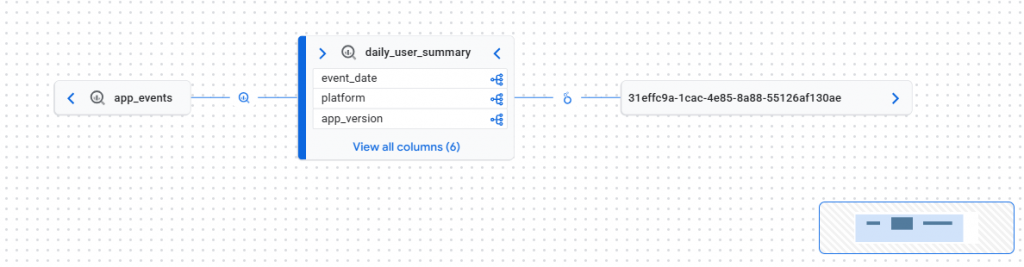
This lineage graph illustrates the data flow from the app_events source through the daily_user_summary aggregate table and finally to a downstream Looker Studio report. The long alphanumeric string (31effc9a…) represents the unique Looker Studio Report ID, which Dataplex uses to identify the specific dashboard consuming the BigQuery data. This end-to-end visibility allows for automated impact analysis, ensuring that changes to upstream aggregate tables are tracked directly to their respective business visualizations.
- Regulatory Compliance: Many industries require strict adherence to standards like GDPR, HIPAA, and CCPA. Enterprise lineage provides the clear audit trail necessary to demonstrate how sensitive data is sourced, handled, and protected across the entire lifecycle.
Inside the Engine: What GCP Lineage Captures and How
Before extending our reach to external clouds, it is vital to understand the native capabilities of the Google Cloud Data Lineage API and how Dataplex orchestrates this metadata collection.
What Information is Captured?
The Data Lineage API does not store actual data records; instead, it captures the metadata of the data’s journey. The information captured is categorized into three primary components:
- Lineage Events: These represent an occurrence of a data transformation or movement at a specific point in time.
- Processes: This identifies the “How”, the specific engine or logic that acted, such as a BigQuery SQL statement, a Dataflow job, or a Cloud Composer task.
- Links (The Graph): These are the edges of your map, defining the relationship between a source (input) and a target (output).
For every captured event, the API records:
- Fully Qualified Names (FQNs): The unique identifiers for the assets (e.g., bigquery:project_id.dataset.table_name).
- Start and End Times: Precisely when the transformation occurred.
- State: Whether the process completed successfully, failed, or is currently running.
GCP uses a Runtime-first approach through the Data Lineage API.
What GCP Lineage Captures:
- Relationships: Links between data assets (tables, views, files).
- Jobs & Processes: Specific SQL statements (SELECT, INSERT, UPDATE, DELETE), Dataflow pipelines, and Dataproc jobs.
- Metadata: Information about the source, transformation logic, and destination, but not the data itself.
Capture Mechanism: Dataplex automatically listens to supported services (BigQuery, Dataflow, Cloud Composer) within a project. For external assets like S3, Dataplex provides a flexible API allowing users to submit custom OpenLineage events.
How Dataplex Captures Lineage (The Native Mechanism)
Dataplex utilizes a “runtime-observation” model. It does not require you to manually define links for supported GCP services; it “listens” to the execution environment.
- Enabling the API: First, the Data Lineage API must be enabled in the project. This acts as the central listener for all lineage-related logs emitted by Google Cloud services.
- Service Integration: Services like BigQuery are “lineage-aware.” When you execute a DML statement (e.g., INSERT INTO … SELECT * FROM …), BigQuery automatically emits a metadata event to the Lineage API.
- Automatic Stitching: The API receives the event, identifies the input table and output table via their FQNs, and creates a “Link” between them.
- Visualization: Dataplex queries the Lineage API to render the visual graph in the Google Cloud Console.
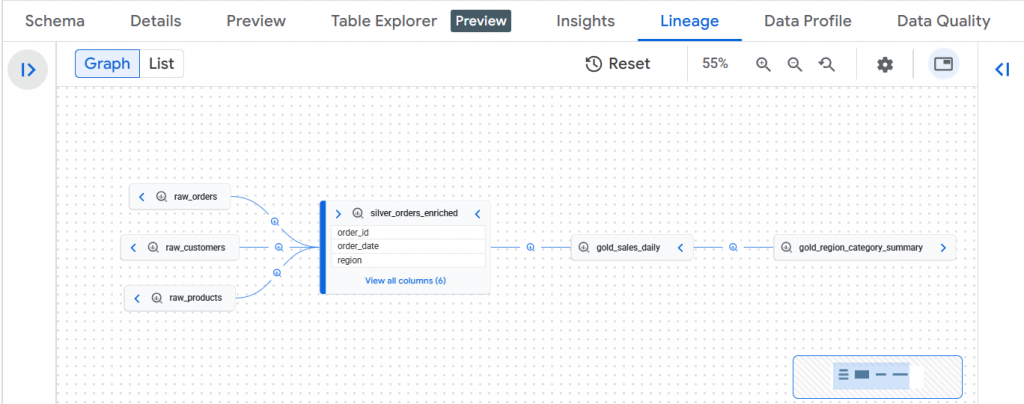
This graph illustrates a layered analytics workflow where raw source tables (raw_orders, raw_customers, raw_products) feed into a Silver enrichment layer (silver_orders_enriched) through business joins, which then drives aggregated Gold models (gold_sales_daily) and a final executive reporting table (gold_region_category_summary).
The primary advantage of the native Dataplex capture is its “zero-touch” nature for GCP-resident data. As long as the API is enabled, the system automatically documents SQL queries and Dataflow pipelines, ensuring that the internal chain of custody is never broken without requiring manual developer intervention.
The Implementation Challenge
Implementing lineage across Multi cloud platform presents several significant hurdles:
- Interoperability Gaps: Different cloud providers use proprietary APIs, metadata formats, and management tools, making smooth data exchange difficult.
- Security & IAM Fragmentation: Maintaining consistent access policies across platforms is complex; each provider has its own IAM structure (e.g., AWS IAM vs. GCP IAM).
- Inconsistency and Data Ownership: Disparate logs and a lack of standard protocols lead to data silos and inconsistencies in how metadata is handled.
- Cost Sharing & Visibility: Tracking costs across multi-cloud environments is difficult due to varying pricing models and a lack of centralized billing visibility.
Achieving a Centralized Lineage Hub
A Centralized Lineage Hub is a single source of truth where multiple projects publish their lineage metadata.
The Approach:
- Standardization: Every project adopts the OpenLineage format, an open standard that unifies lineage reporting.
- Serverless Event-Emitters: Instead of costly orchestration, lightweight tools (like Cloud Functions triggered by Eventarc) parse logs from migration jobs
- Cross-Project Publishing: Each project uses a service account with the datalineage.producer role to push events to a central project’s Data Lineage API.
- Consolidated Visualization: Dataplex stitches these events together, displaying a unified graph that bridges the cloud gap.
Pushing OpenLineage Events to the Data Lineage API
The Data Lineage API acts as a consumer that listens for standardized OpenLineage messages to draw the connections on your graph.
1. OpenLineage RunEvent Payload Structure
You must construct a JSON payload that follows the OpenLineage 1.0 specification. It is critical that the namespace and name fields correctly represent the Fully Qualified Names (FQNs) of both the source and the target systems, as these identifiers are used by Dataplex to build lineage graphs.
Core Fields
| Field | Description |
| eventType | Lifecycle stage of the run. Use COMPLETE for successful completion. |
| eventTime | Timestamp when the operation completed, in ISO 8601 format. |
| job | Logical identifier of the recurring process or pipeline. |
| run | Unique identifier for this specific execution instance. |
| inputs | Source datasets consumed by the run. |
| outputs | Target datasets produced by the run. |
An OpenLineage event is represented as a JSON object describing a single execution of a data movement or transformation.
2. Dataset Identification (Namespace & Name)
Each dataset must be uniquely identified using a namespace + name pair. These values must remain stable and consistent across events.
Input Dataset (External Source)
Namespace: Identifies the source system or platform (e.g., s3, gcs, kafka, mysql)
Name: Fully qualified dataset or object identifier within that system
Example patterns:
- bucket/path/file.csv
- topic-name
- database.schema.table
Output Dataset (Cloud Data Platform)
Namespace: Target system identifier (e.g., bigquery)
Name: Fully qualified dataset name
3. Job and Run Identification
A job represents the logical pipeline or recurring task.
"job": {
  "namespace": "external-ingestion",
  "name": "data-sync-job"
}
Run represents a single execution instance.
"run": {
  "runId": "<unique-run-id>"
}
Run must be unique per execution and typically derived from: Audit log insert ID, Scheduler run ID, or UUID.
4. Submitting the Event to the Data Lineage API
Use the processOpenLineageRunEvent method to push lineage metadata:
- Authenticate using Application Default Credentials
- Submit the OpenLineage JSON payload
- The Data Lineage service ingests and visualizes the lineage automatically
This mechanism supports:
- External ingestion tools
- Batch pipelines
- Streaming systems
- Orchestrators (Airflow, Dataform, DBT, etc.)
Capturing S3-to-BigQuery DTS lineage as an example for capturing external Lineage
Architecture
Implementing cross-platform data lineage from Amazon S3 to Google BigQuery involves integrating external metadata into the Google Cloud Data Lineage API. Because S3 is an external source, Dataplex cannot “listen” to it natively; instead, you must use a Serverless Event-Driven approach to “stitch” the lineage together.
The implementation follows a “Lineage Hub” model where metadata is emitted as OpenLineage events when data movement occurs.
Automation Workflow
The architecture leverages a serverless,
Automated S3-to-BigQuery Lineage Architecture
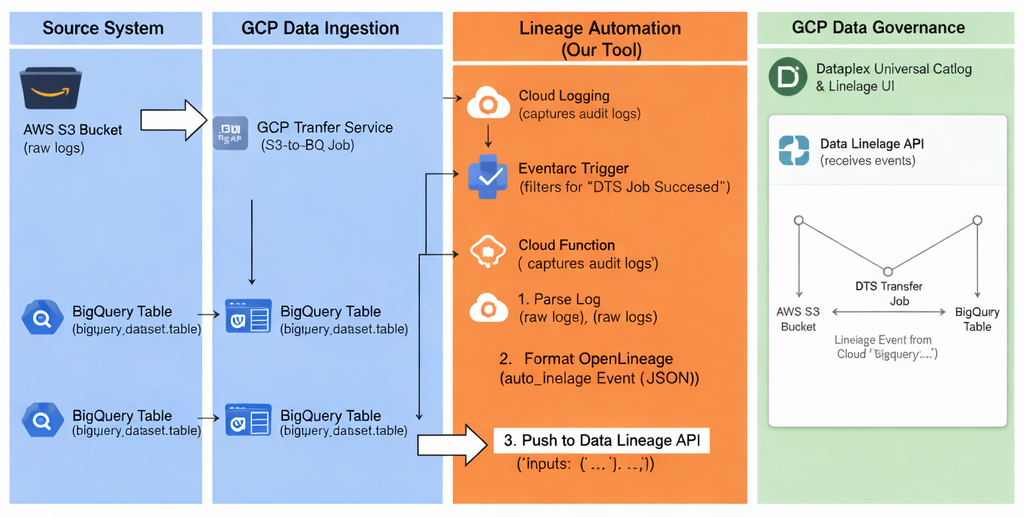
“zero-infrastructure” flow to ensure that every successful data migration is immediately documented.
- The Trigger: A BigQuery Data Transfer Service (DTS) job completes, generating a Cloud Audit Log entry.
- The Mediator: Eventarc monitors Cloud Logging for specific audit events and routes them to a Cloud Function.
- The Producer: The Cloud Function acts as an OpenLineage producer. It extracts metadata from the log and translates it into a standard OpenLineage RunEvent.
- The Sink: The function pushes the metadata to the Data Lineage API via an authenticated HTTPS endpoint, which then updates the Dataplex Universal Catalog.
Implementation Steps
Step 1: Enable the Required APIs and IAM Roles
Before starting, enable the foundational services in your Google Cloud project.
- Enable APIs: datalineage.googleapis.com, eventarc.googleapis.com, cloudfunctions.googleapis.com, and bigquerydatatransfer.googleapis.com.
- Grant IAM Roles: Ensure your service account has the following roles:
- roles/datalineage.producer: To create processes, runs, and events.
- roles/datacatalog.admin: To manage entry types and custom entries.
Step 2: Custom Metadata Registration (Dataplex)
Because Amazon S3 is external to Google Cloud, you must create a “placeholder” in the Dataplex Universal Catalog to represent the S3 bucket or file.
- Create an Entry Group: Think of this as a folder for your custom S3 metadata.
- Define an Entry Type: Create a template (e.g., s3_bucket_type) that describes what an S3 asset looks like (owner, region, etc.).
- Create the Entry: Register the specific S3 asset (e.g., projects/my-project/locations/global/entryGroups/s3-group/entries/my-s3-bucket).
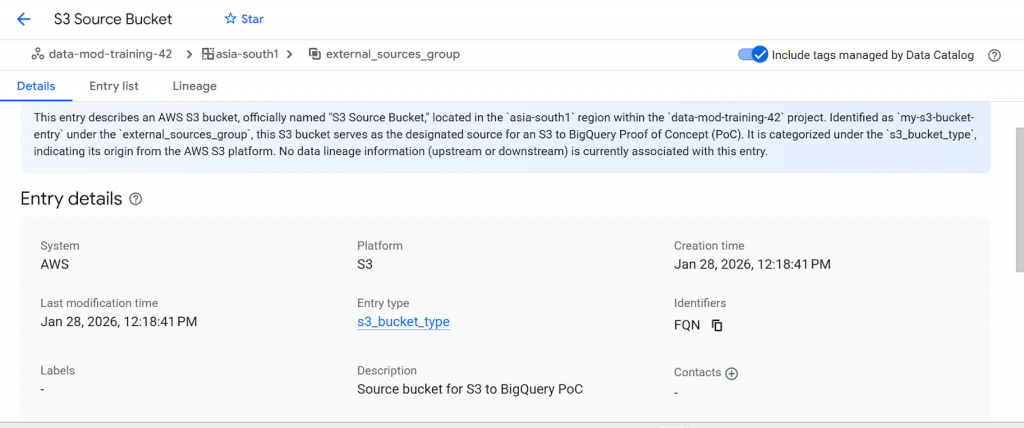
This entry describes an AWS S3 bucket, officially named “S3 Source Bucket,” Identified as `my-s3-bucket-entry` under the `external_sources_group`. This S3 bucket serves as the designated source for an S3 to BigQuery. It is categorized under the `s3_bucket_type`, indicating its origin from the AWS S3 platform
4. Create Entry: Create a specific Entry within your group for the S3 bucket using the fullyQualifiedName format: s3://bucket-name.
- Note: Using a consistent fullyQualifiedName is critical for Dataplex to stitch the manual events to the correct visual nodes.
Step 3: Deploy the Cloud Run Producer
This service acts as the “translator” that turns a Google audit log into an OpenLineage event.
The Cloud Function listens to BigQuery Data Transfer Service audit logs and automatically emits OpenLineage events to Dataplex Lineage.
This snippet demonstrates how execution-time audit logs are translated into OpenLineage events to capture accurate, cross-cloud data lineage in Dataplex without modifying the underlying data pipeline.
    # Extract source & target metadata
    s3_uri = (
        params.get("data_path")
        or params.get("source_uris", [""])[0]
    )

    bq_table = params.get("destination_table_name_template")
    bq_dataset = transfer_config.get("destinationDatasetId")
    project_id = os.environ.get("PROJECT_ID")

    if not all([s3_uri, bq_table, bq_dataset, project_id]):
        return "Ignored: Missing metadata", 200

    # Build OpenLineage event
    event = {
        "eventType": "COMPLETE",
        "eventTime": proto.get("endTime") or proto.get("startTime"),
        "run": {
            "runId": envelope.get("insertId")
 },
        "job": {
            "namespace": "aws-s3-to-bigquery",
            "name": proto.get("resourceName")
        },
        "inputs": [{
            "namespace": "s3",
            "name": s3_uri.replace("s3://", "")
        }],
        "outputs": [{
            "namespace": "bigquery",
            "name": f"{project_id}.{bq_dataset}.{bq_table}"
        }]
    }
Step 4: Configure the Eventarc Trigger
Eventarc acts as the “mediator” that detects the completion of the S3-to-BigQuery transfer.
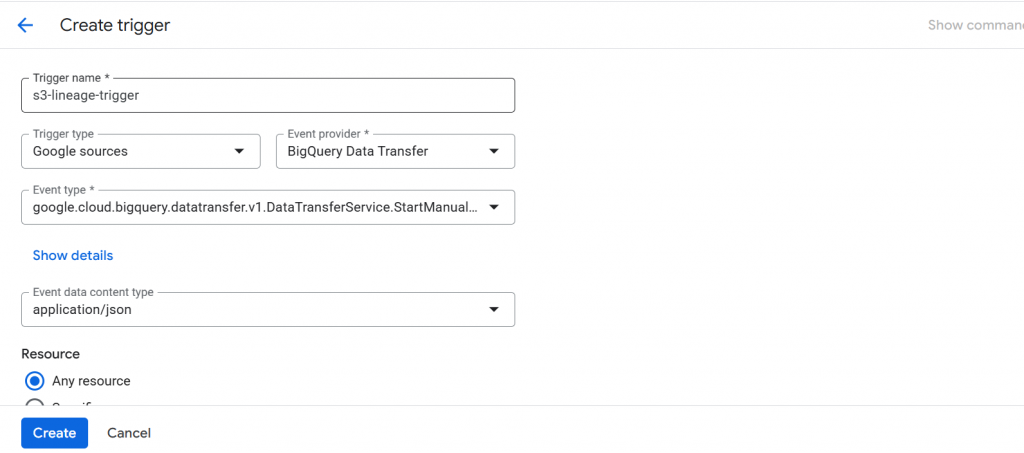
- Filter on Method: Create a trigger that listens specifically for the audit log method: google.cloud.bigquery.datatransfer.v1.DataTransferService.StartManualTransferRuns.
- Destination: Route these detected events directly to your deployed 2nd Gen Cloud Function.
Step 4: Execute and Verify in Dataplex
- Manually trigger the S3-to-BQ transfer in the console.
- Once the transfer succeeds, the Cloud Function will automatically push the OpenLineage event.
- Navigate to Dataplex > Search, find your target BigQuery table, and click the Lineage tab.
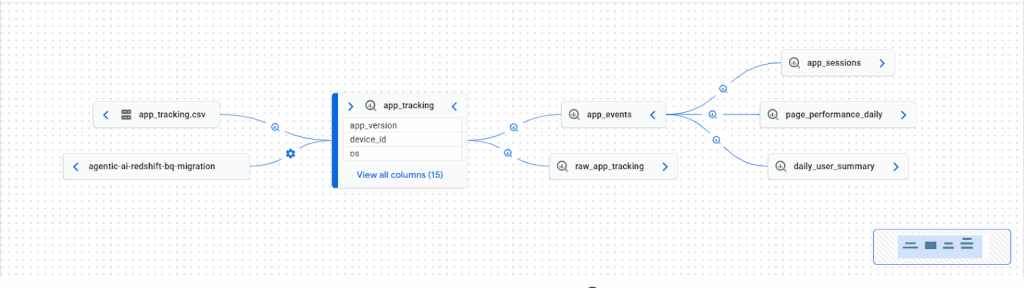
This lineage graph illustrates the automated data flow from an external AWS S3 source to a centralized BigQuery warehouse. The path begins at the agentic-ai-redshift-bq-migration bucket, where raw files like app_tracking.csv are ingested and transformed into the app_tracking table. This core table then serves multiple downstream analytical processes, including session tracking and daily performance summaries.
Capturing Kafka-to-BigQuery Lineage: Conceptual Overview for Streaming Ingestion
Let us consider another example to understand how lineage can be extended to streaming ingestion scenarios. In Kafka-to-BigQuery pipelines, lineage follows the same Unified Data Platform principles used for batch pipelines, with lineage captured at execution time rather than inferred. Kafka topics are treated as external assets and registered once in Dataplex as custom entries. When a streaming ingestion job (such as Dataflow, Kafka Connect, or a custom consumer) successfully writes data to BigQuery, it emits an OpenLineage event describing the source topic and target table. This event is pushed to the GCP Data Lineage API, which Dataplex uses to stitch Kafka topics and BigQuery tables into a unified lineage graph. As a result, both streaming and batch pipelines can be governed consistently without requiring native Kafka integration or pipeline rewrites.
Conclusion
This implementation successfully establishes a standardized, automated, and cloud-agnostic lineage framework for tracking data movement from external systems into Google Cloud. By adopting the OpenLineage standard and integrating it with GCP’s Data Lineage API, the solution eliminates the historical blind spot around external and cross-cloud data ingestion, an area where native tooling alone falls short.
The approach directly addresses the existing challenges of missing lineage visibility, fragmented metadata, and manual governance workflows by programmatically capturing source-to-target relationships at execution time and persisting them in Dataplex. As a result, data teams gain end-to-end traceability, auditors receive verifiable lineage records, and platform owners can perform impact analysis and compliance checks with confidence.
To operationalize lineage beyond the Dataplex UI, extracted lineage metadata can be programmatically persisted into BigQuery tables in a normalized assets–relationships model. This enables lineage to be queried, audited, and visualized using standard BI tools such as Looker, allowing non-technical stakeholders to consume lineage insights through governed reports rather than API calls or platform-specific consoles.
Most importantly, this design is scalable and reusable: the same pattern can be extended to any external source, ingestion framework, or orchestration tool without re-architecting the governance layer. By decoupling lineage capture from the underlying data movement technology, the solution transforms lineage from a reactive afterthought into a first-class, enterprise data governance capability, enabling consistent oversight in a multi-cloud and hybrid data ecosystem.