
According to studies, 83% of data migration projects either fail outright or exceed their budgets and timelines. Enterprise data warehouse migrations are complex, time-consuming, and fraught with challenges from schema incompatibilities and data type mismatches to performance optimization and validation. Traditional migration approaches often require extensive manual intervention, custom scripting, and iterative troubleshooting, consuming months of engineering effort with no guarantee of success.
Automate your migration with AI agents.
What if we could automate this entire process using intelligent AI agents that understand your source schema, optimize for the target platform, and orchestrate the migration end-to-end? In this blog, we’ll explore how we built an AI agent-driven migration system that automates the complete journey from Amazon Redshift to Google BigQuery, leveraging Vertex AI (Gemini), BigQuery Data Transfer Service (DTS), utilizing the staging S3 location, and a modular agent architecture.
The Challenge: Why Redshift to BigQuery Migration is Complex
From our experience migrating enterprise data warehouses, we’ve identified four core challenges that plague every Redshift to BigQuery migration.
Migrating from Amazon Redshift to Google BigQuery involves several technical hurdles:
1. Schema Incompatibilities
- Redshift-specific data types (e.g., SUPER, GEOMETRY) don’t have direct BigQuery equivalents.
- Distribution keys (DISTKEY) and sort keys (SORTKEY) need to be translated to BigQuery’s partitioning and clustering
2. Cross-Cloud Data Movement
- Data must traverse cloud boundaries (AWS → GCP)
- Requires secure credential management and S3 staging
- Network connectivity and firewall configurations
3. Performance Optimization
- BigQuery’s columnar storage requires different optimization strategies
- Partitioning and clustering decisions impact query performance
- Table design patterns differ significantly
4. Validation & Monitoring
- Ensuring data integrity across millions of rows
- Tracking migration progress across multiple tables
- Handling failures and retries gracefully
Traditional Approach: Manual schema analysis, developing ETL pipelines, Manually Handling Failure’s, iterative testing, and weeks of engineering effort.
Our Solution: An intelligent, agent-driven workflow that automates the entire migration lifecycle.
Solution Architecture: Agent-Based Orchestration
Our solution employs a modular, agent-driven architecture where each agent is responsible for a specific stage of the migration lifecycle.
This design ensures:
- Separation of Concerns: Each agent has a single, well-defined responsibility
- Extensibility: New agents can be added without disrupting existing workflows
- Controlled Automation: Human oversight at critical decision points
- Traceability: Clear audit trail of all transformations and decisions
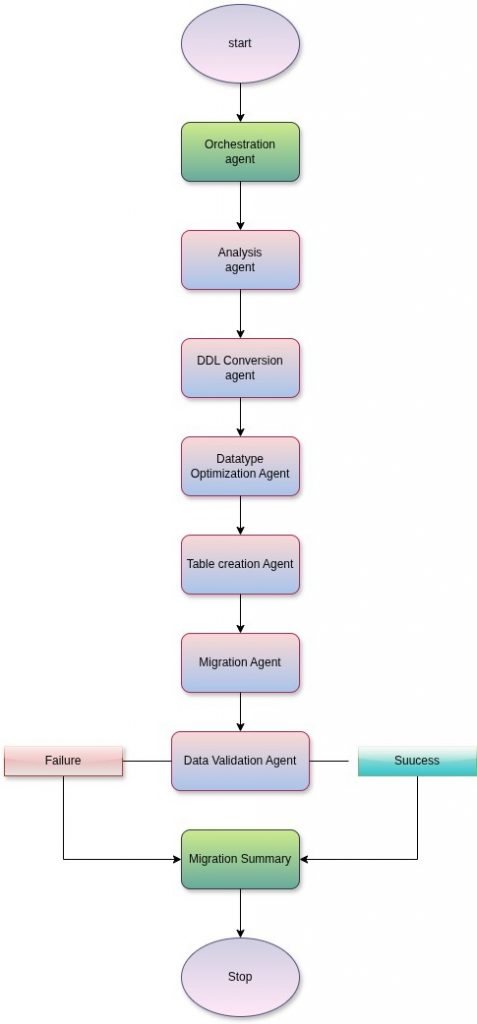
Fig 1: Visual illustration of an agent-driven workflow for automated database schema conversion, migration, and validation.
Technology Stack
Google Cloud Platform:
Vertex AI (Gemini): Powers intelligent schema conversion and optimization
BigQuery: Target data warehouse
BigQuery Data Transfer Service (DTS): High-performance data migration engine
Google Cloud Storage: Intermediate staging used by DTS Jobs.
Amazon Web Services:
Amazon Redshift: Source database
Amazon S3: Staging area for UNLOAD operations
AWS IAM Access Key and Secure Key: Secure cross-cloud access
The Agent Workflow: End-to-End Automation
To address Redshift-to-BigQuery migration challenges such as schema incompatibilities, manual effort, optimization gaps, and data validation risks, we use a structured, agent-based migration framework.
An Orchestration Agent coordinates the end-to-end workflow; the Analysis Agent extracts and validates source schema metadata; the Conversion Agent translates Redshift schemas into BigQuery-compatible formats; the Optimization Agent aligns schemas with BigQuery best practices; the Table Creation Agent materializes schemas safely in BigQuery; the Migration Agent executes and monitors automated data movement; and the Validation and Summary Agent confirms migration success and produces a consolidated report.
Together, these agents enable repeatable, scalable migrations with reduced effort, fewer data issues, and predictable outcomes.
Let’s dive deep into how each agent contributes to the migration process.
Agent 1: Orchestration Agent
Responsibility: The orchestration agent operates in the background, managing the workflow for all the other agents listed below.
Agent 2: Analysis Agent
Responsibility: The Analysis Agent is responsible for understanding the source schema in detail.
Key functions:
- Redshift to BigQuery
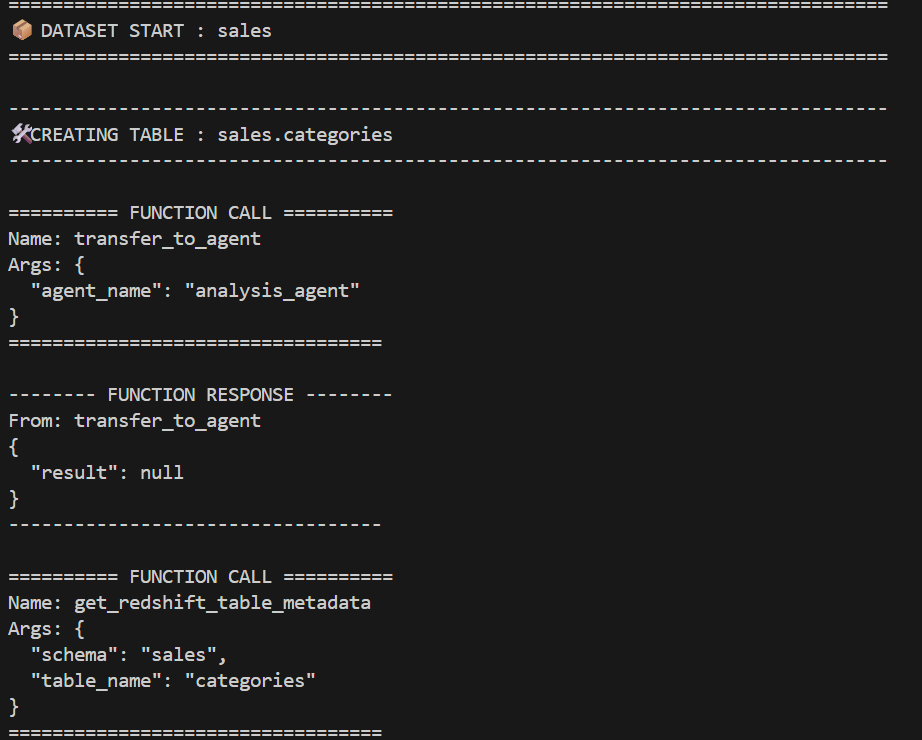
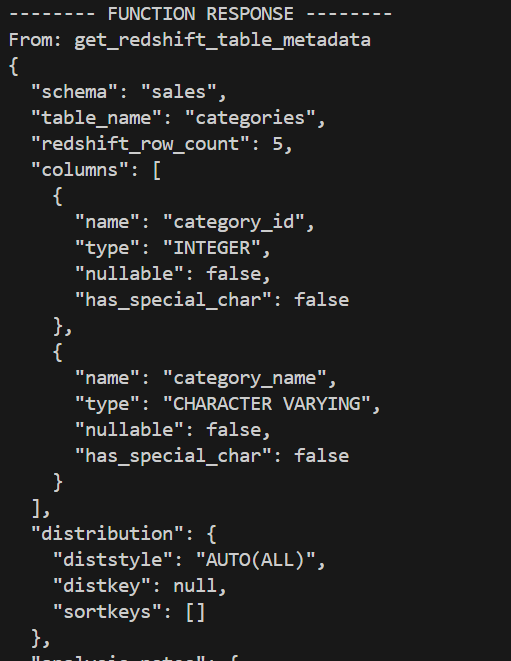
- Connects to Amazon Redshift to retrieve the schema definition of a specified table via the tool get_redshift_table_metadata using
- Host
- Port
- Database_name
- Username
- Password
- Examines the provided Redshift schema.
- Parses table definitions, column names, data types, constraints, and other structural attributes.
- Normalizes the extracted metadata into an internal representation that can be consumed by downstream agents.
- Performs basic validation to ensure the schema is well-formed and complete.
- Passes the analyzed schema metadata to the Conversion Agent for further processing
- Uses the tool to query and extract column types, primary keys, and Dist/Sort keys.
- This data, such as row counts, is stored to allow the validation tool to confirm the successful completion of the migration.
- Forwards the extracted metadata to the downstream Conversion Agent for further processing.
Agent 3: Conversion Agent
Responsibility: Translate Redshift schema to BigQuery-compatible format
Key Functions: The Conversion Agent focuses on cross-platform compatibility.
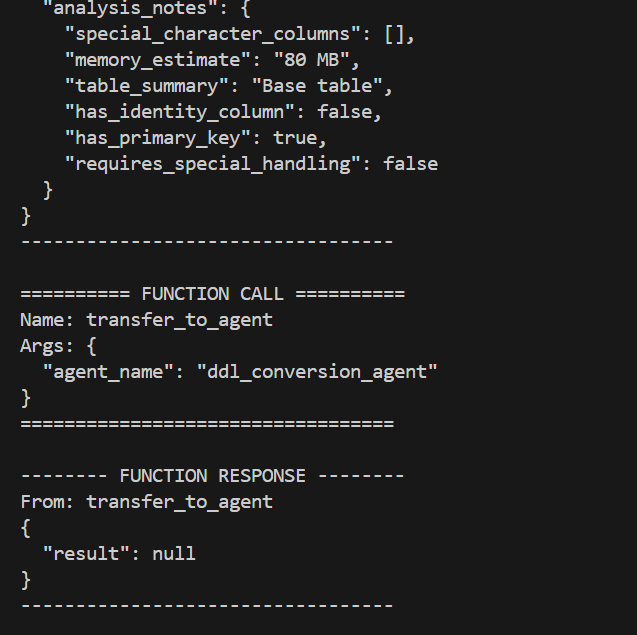
- Converts the analyzed Redshift schema into a BigQuery-compatible schema format.
- Maps Redshift data types to their closest BigQuery equivalents.
- Data Type Mapping:
- INTEGER → INT64
- VARCHAR(n) → STRING
- DECIMAL(p,s) → NUMERIC or BIGNUMERIC
- TIMESTAMP → TIMESTAMP
- SUPER → JSON
- Constraint Translation:
- Primary keys → Documented (BigQuery doesn’t enforce PKs)
- NOT NULL constraints → Preserved where applicable
- Redshift-Specific Attributes:
- DISTKEY → Mapped to clustering candidates
- SORTKEY → Mapped to partitioning candidates
- Adjusts column definitions to align with BigQuery-supported constraints and limits.
- Ensures compliance with BigQuery naming conventions and reserved keyword restrictions.
- Produces a finalized, BigQuery-ready schema definition and forwards it to the Optimization Agent.
Agent 4: Optimization Agent
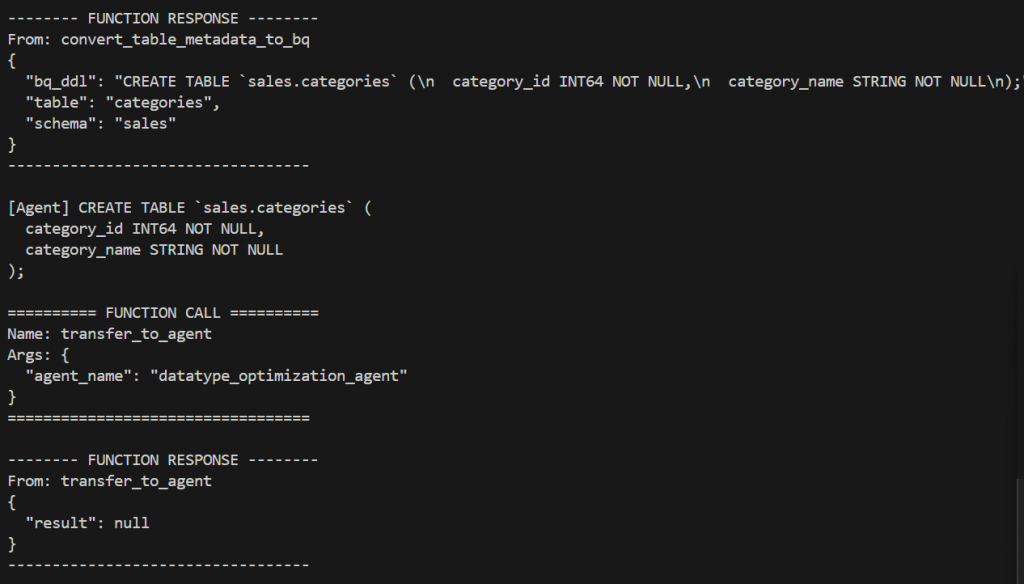
Responsibility: The Optimization Agent enhances the converted schema to better suit BigQuery best practices.
Key Functions:
- Reviews the converted schema for optimization opportunities.
- Applies schema-level improvements such as removal or adjustment of Redshift-specific attributes that are not applicable in BigQuery.
- Produces an optimized intermediate schema that balances correctness with performance considerations.
- Suggests appropriate partitioning and clustering strategies for storing the data in BigQuery if the user allows.
- Sends the optimized schema to the Table Creation Agent.
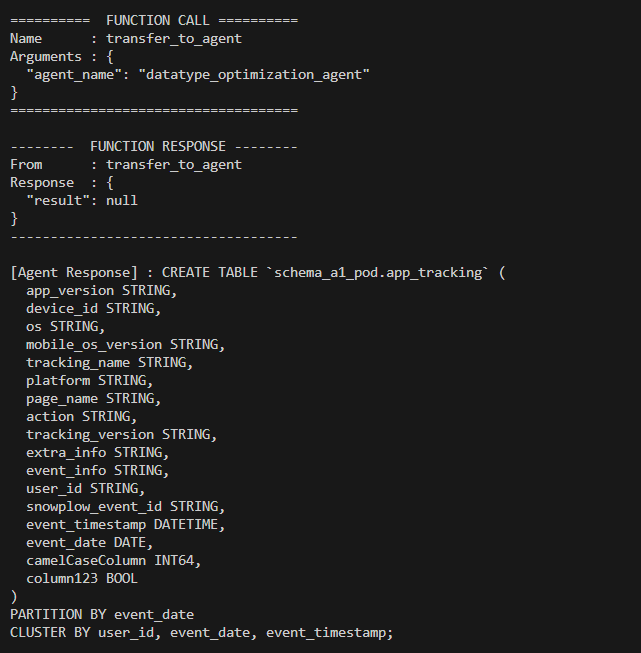
Below is the agent response when the optimization flag is set to false.
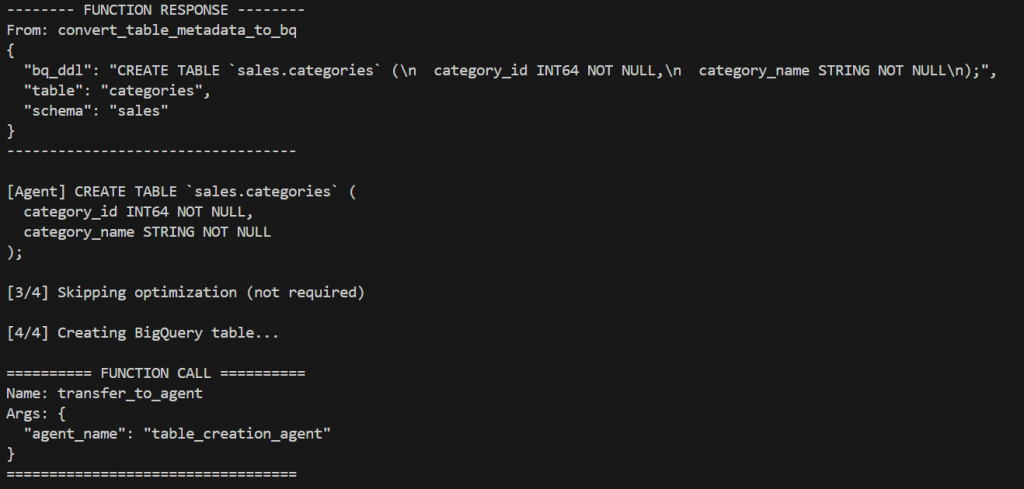
Agent 5: Table Creation Agent
Responsibility: Materialize the schema in BigQuery
Key Functions:
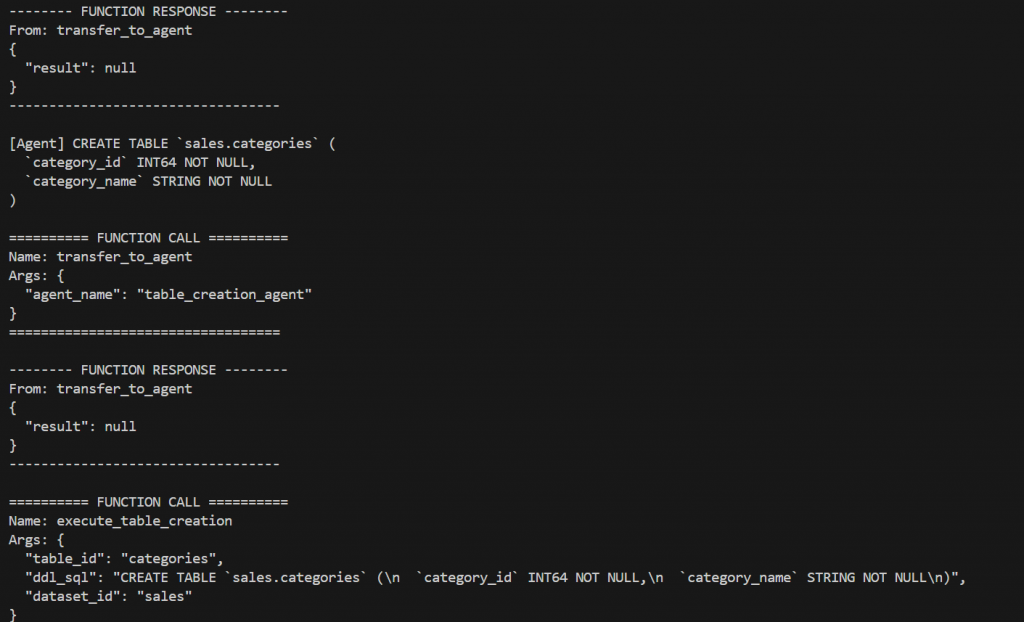
The Table Creation Agent materializes the schema in the target environment.
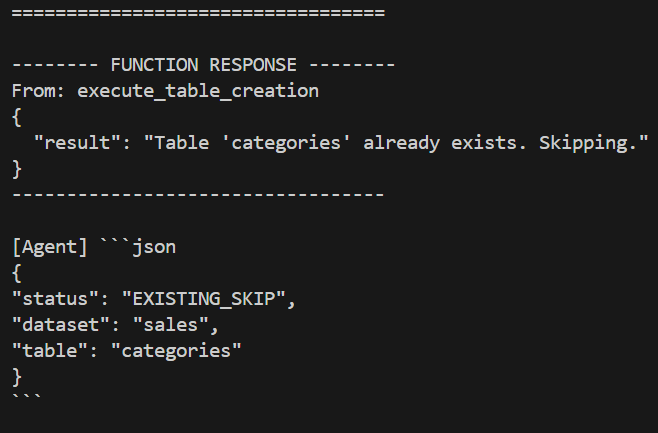
- Creates the target BigQuery dataset if it does not already exist.
- Iterates through all tables defined within the schema.
- Creates BigQuery tables using the optimized schema definitions.
- Handles idempotency by safely skipping or validating existing tables where applicable.
- Ensures that all tables belonging to a single schema are successfully created before allowing the workflow to proceed to data migration.
Agent 6: Migration Agent
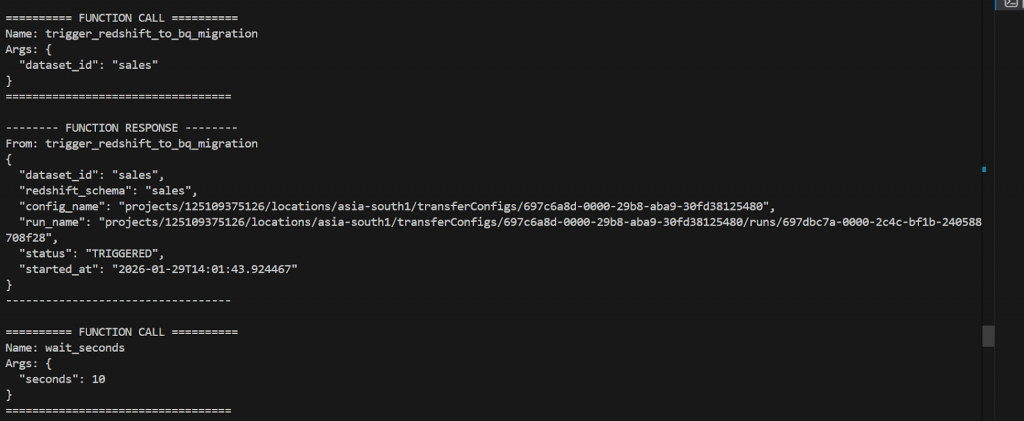
Responsibility: The Migration Agent is responsible for executing and monitoring the data movement.
Key Functions:
- Configuration needed for Redshift to BigQuery migration: Jdbc_url, Username, Password, Access key, and Secret Key.
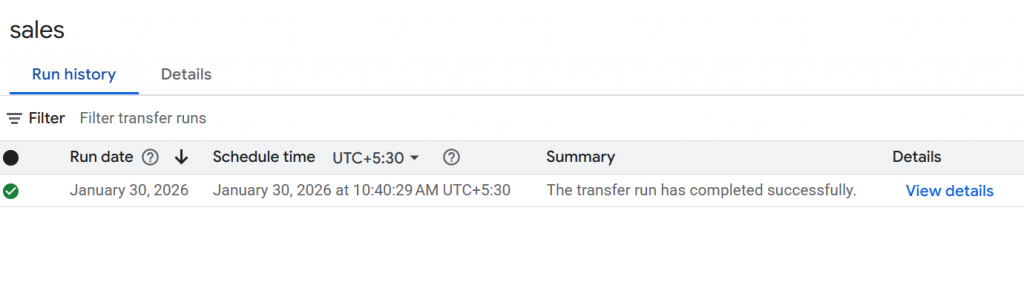
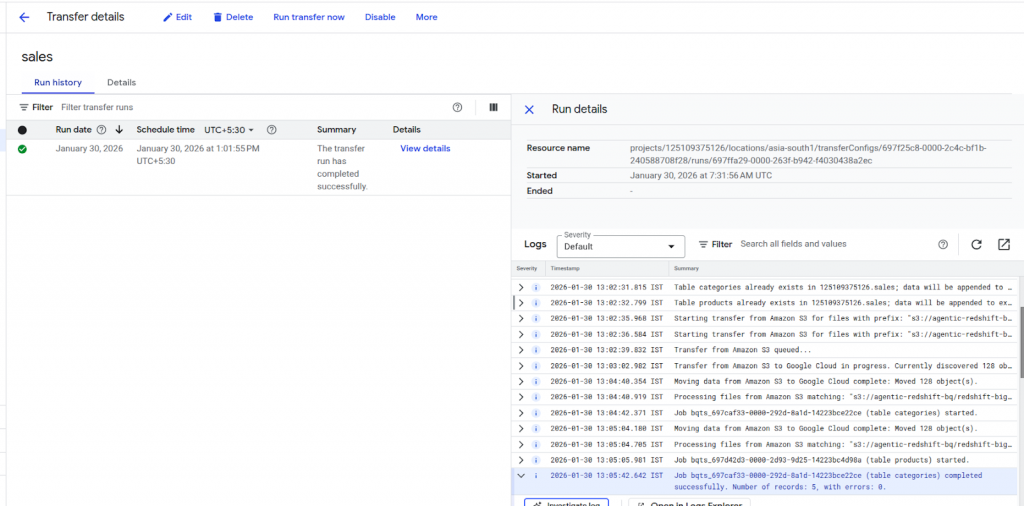
- Triggers DTS migration jobs programmatically.
- Continuously monitors the state of each DTS job.
- Polls job status until completion (SUCCESS or FAILURE).
- Captures execution metadata, including job states, timestamps, and error messages, if any.
Agent 7: Validation & Summary Generation
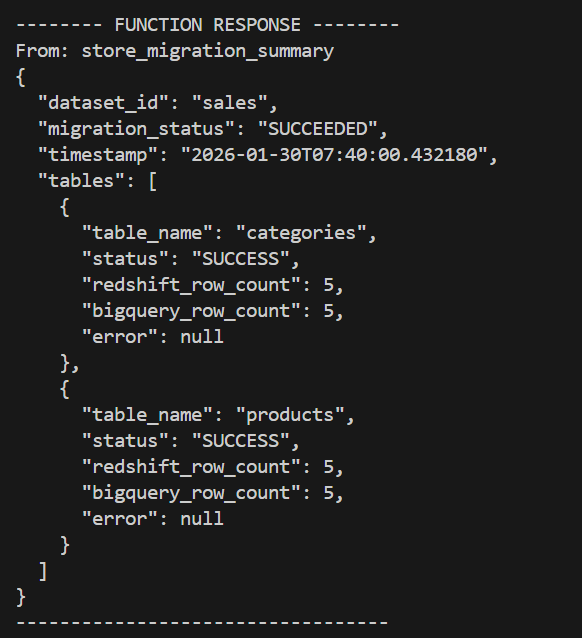
Responsibility: Once migration jobs are complete, the workflow performs final validation and reporting.
- Confirms successful completion of all DTS jobs for the schema.
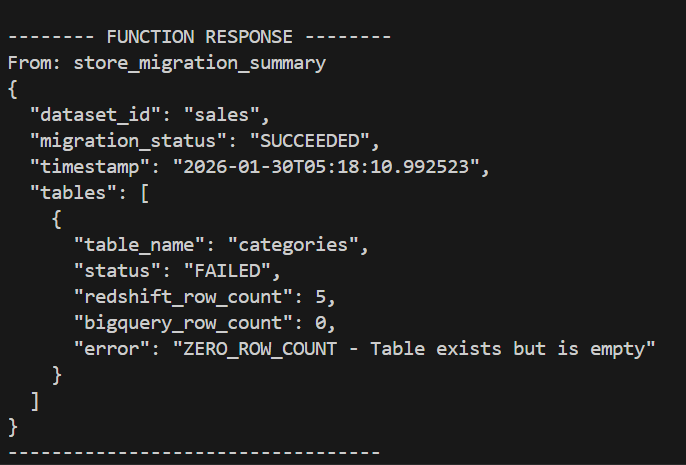
- Validates that expected tables were populated.
- Aggregates results across all agents.
- Generates a consolidated summary report covering:
- Tables analyzed
- Tables successfully created
- Migration status per table
- Any failures, warnings, or anomalies encountered during execution
The workflow concludes only after all tables in the schema have been successfully migrated, validated, and summarized, providing a clear end-to-end view of the migration outcome.
Below is the completed endpoint of the migration with the summary.
Below is the output when there was a mismatch in the redshift_row_count and the bigquery_row_count.
Deployment Architecture
Current Setup
The current proof-of-concept deployment is running on a local development machine, which is suitable for testing and validation purposes. This setup allows for rapid iteration and debugging during the POC phase.
Future Production Deployment
VM-Based Deployment: The Right Control Plane
For production deployments, the migration orchestration framework will be deployed on a Google Compute Engine Virtual Machine (VM). This approach provides several critical advantages:
Why VM is the Right Control Plane:
1. Persistent Execution Environment
- Long-running migration jobs can execute without interruption
- No dependency on local machine availability
- Survives network disconnections and local system restarts
2. Scalability & Resource Management
- VM can be sized appropriately for workload (CPU, memory)
- Can scale vertically for large schema migrations
- Dedicated resources ensure consistent performance
3. Network Optimization
- Direct connectivity to Google Cloud services (low latency)
- No firewall/proxy issues common in local environments
- Optimized network paths for data transfer
4. Security & Compliance
- Credentials stored in Secret Manager, not local files
- VM runs in a controlled VPC with security policies
- Audit logging and monitoring are built in
- Compliance with enterprise security standards
Key Benefits of the Agent-Driven Approach
1. Automation at Scale
- Migrate entire schemas with a single command
- No manual DDL writing or data type mapping
- Handles hundreds of tables automatically
2. Intelligence & Adaptability
- AI-powered schema conversion using Vertex AI (Gemini)
- Context-aware optimization decisions
- Learns from Redshift-specific patterns
3. Reliability & Validation
- Built-in data integrity checks
- Automatic retry mechanisms
- Comprehensive error handling
4. Observability & Traceability
- Detailed logging at every stage
- Clear audit trail of all transformations
- Real-time progress monitoring
5. Extensibility
- Modular architecture allows easy addition of new agents
- Can be integrated with orchestration tools.
- Supports custom validation rules
6. Cost Efficiency
- Reduces migration time from weeks to hours
- Minimizes manual engineering effort
- Optimizes BigQuery storage and query costs through intelligent partitioning
Conclusion
The agent-driven approach represents a paradigm shift in how we think about data migrations from manual, error-prone processes to intelligent, automated workflows that scale with your business needs. By leveraging AI agents, intelligent automation, and native cloud services, we’ve demonstrated that complex migrations can be:
- Reduced Manual Effort: Automates schema analysis, conversion, optimization, and validation, significantly lowering hands-on effort compared to using DTS alone.
- Streamlined Pre- and Post-Migration Phases: While data transfer duration depends on source cluster configuration, the agent-driven approach reduces time spent on planning, setup, and post-migration fixes.
- Intelligent Automation: AI-powered schema translation and optimization minimize rework caused by incompatible data types and suboptimal schema designs.
- Improved Reliability: Built-in validation, metadata checks, and error handling reduce data inconsistencies and migration-related issues.
- Lower Operational Overhead: Requires less manual monitoring, troubleshooting, and coordination than traditional, DTS-only migration workflows.
- Scalable and Repeatable: Easily scales across multiple schemas and environments without a proportional increase in manual effort.
- Predictable Outcomes: Standardized agent workflows ensure consistent results across migrations, reducing uncertainty and operational risk.
Key Challenges & Future Enhancements
This approach enabled a successful end-to-end migration, resulting in reduced estimated effort and improved data reliability with fewer migration-related issues.
- Flexible and unsupported column names:
DTS-based migrations can fail when column names contain special or unsupported characters. This would be addressed by implementing a column normalization rule in the migration configuration, which retains supported characters and systematically replaces unsupported characters with underscores (_). This ensures compliance with BigQuery naming conventions while preserving column semantics.
- CSV-related ingestion failures:
CSV-based ingestion can encounter failures due to formatting inconsistencies or malformed records. As a future enhancement, the agentic framework can be extended to detect such ingestion errors and automatically trigger a Redshift UNLOAD command as a retry mechanism. This would allow the agent to switch ingestion strategies dynamically, improving resilience and reducing manual intervention.