

Industry studies estimate that data teams spend up to 40% of their time resolving quality issues. When data is missing, inaccurate, or inconsistent, it can disrupt operations, delay decision-making, and erode trust in analytics. Instead of constantly fixing problems, organizations should focus on improving data reliability and enabling faster access to trusted insights. In this blog, we’ll explore key warning signs that your data environment may have a quality problem, and how to address them.
Strengthen data reliability in BigQuery with Niveus
Missing values can break production pipelines. Inaccurate data leads to flawed business decisions, while shifts in data distribution can silently degrade machine learning performance. The impact isn’t theoretical; poor data can result in irrelevant product recommendations, poor customer experiences, and lost revenue. In high-stakes sectors like healthcare, the risks are even greater, where incorrect or incomplete data can contribute to serious clinical errors. Data quality isn’t just an operational concern; it’s a business and ethical imperative.
Why Data Quality Issues Amplify in BigQuery
Migrating to BigQuery solves your scalability problems, but it doesn’t solve your data quality problems. Those travel with you to the cloud.
BigQuery’s Strengths:
- Serverless: BigQuery is a fully managed service, which means that you don’t have to worry about infrastructure, capacity planning, or maintenance.
- Scalability: BigQuery can grow to petabyte-sized data warehouses and is built to handle extremely large datasets.
- High performance: BigQuery achieves quick query performance on big datasets by utilising sophisticated query optimisation algorithms and a columnar storage style.
- Integration with other GCP services: BigQuery’s complete integration with other GCP services, including Cloud Storage, Cloud Functions, and Data Studio, makes data analysis using other GCP tools and resources simple.
- Data security: BigQuery has several security features, such as access control, encryption of data while it’s in transit and at rest, and adherence to industry standards like GDPR and HIPAA.
These capabilities accelerate analytics maturity while reducing friction in ingestion and access.
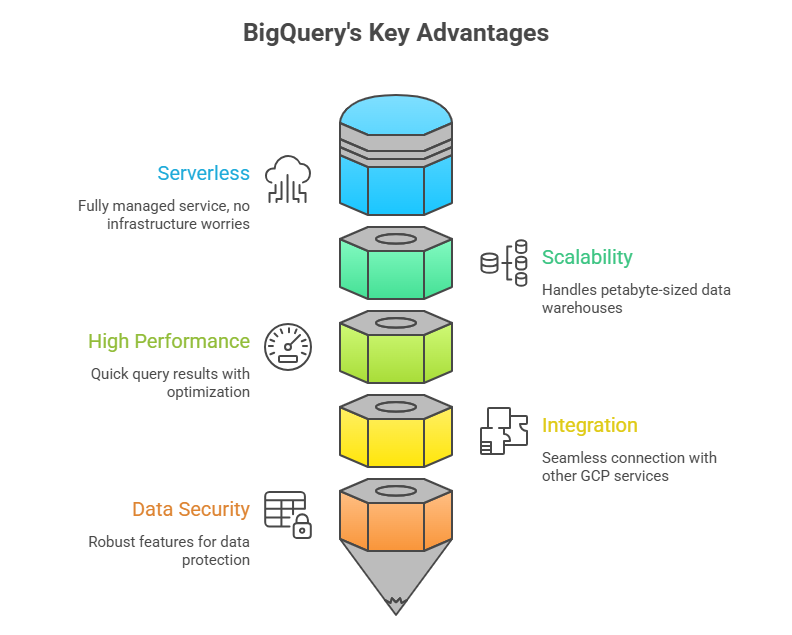
Fig 1: Visual Illustration of BigQuery’s Data Quality Challenges: Serverless Architecture, Scalability, High Performance, Integration with other GCP services, and Data Security
When Strength Becomes Risk:
- Schema drift from streaming ingestion can go unnoticed until dashboards break.
- Over-reliance on downstream transformations means bad data reaches downstream systems before validation occurs.
- Self-serve analytics without governance leads to inconsistent joins, duplicated logic, and conflicting KPIs.
- On-demand resource elasticity creates high performance but allows unoptimized queries to trigger immediate, unexpected cost spikes.
Because BigQuery prioritizes scale, flexibility, and performance, it assumes that data engineering teams implement strong ingestion validation and governance controls.
5 Warning Signs of BigQuery Data Quality Issues
Sign #1: KPI Drift Without Code Changes
You check your revenue dashboard on Monday: ₹50 lakhs this month.
You check again on Wednesday: ₹43 lakhs this month.
Nothing in the business changed. No code was deployed. No queries were modified. But the number changed. This is called “KPI drift”, and it’s one of the most trust-destroying data quality issues because nobody knows which number is correct.
Why It Happens
- Late-arriving data: Delayed transactions or events update historical records and change previously calculated totals.
- Multiple dataset versions: Different teams query tables like sales_v1, sales_v2, or derived models that contain slightly different logic.
- Metric logic fragmentation: Metric definitions exist across SQL queries, BI tools, spreadsheets, and notebooks.
- Upstream corrections: Operational systems update historical records without notifying analytics pipelines.
In partitioned tables, late-arriving events or backfilled data can update historical partitions, causing previously computed metrics to change.
Without centralized metric definitions and governance, teams spend weeks reconciling reports instead of generating insights.
Sign #2: Sudden NULL Spikes or Schema Drift
All you need to do is count the number of entries in a dataset that have empty fields, then track that figure over time.
- Monday: Customer table has 2% NULL phone numbers (normal baseline)
- Tuesday: Customer table has 47% NULL phone numbers (red alert!)
Or schema changes appear unexpectedly:
- A critical column suddenly disappears
- Data types shift (phone numbers become text instead of integers)
- New columns appear that nobody anticipated
Why It Happens
- Upstream system updates: Operational systems rename fields or modify payload structures.
- API structure changes: Third-party integrations alter JSON responses without notice.
- Insufficient ingestion validation: BigQuery enforces column structure but allows NULL values unless columns are explicitly defined as NOT NULL, allowing incomplete records to enter pipelines when upstream validation is weak.
- Missing field mappings: ETL or ELT jobs continue loading data even when upstream fields change.
Without monitoring and validation, schema drift and missing data propagate across downstream transformations and analytics models.
Sign #3: Duplicate Records in Fact Tables
What it looks like:
The same transaction, customer, or event appears multiple times in tables that should contain unique records.
| Order_ID | Customer | Amount | Timestamp |
| 12345 | Ram | ₹5,000 | 2026-02-15 10:23:00 |
| 12345 | Ram | ₹5,000 | 2026-02-15 10:23:00 |
Your revenue report now shows ₹10,000 even though you actually sold ₹5,000. Multiply this across thousands of transactions, and your numbers become completely unreliable.
Why It Happens
- Multiple ingestion pipelines: Different services write the same events to a shared dataset.
- Retry logic without idempotency: Failed ingestion jobs retry and insert the same data again.
- Weak deduplication logic: Query optimizations remove safeguards such as deterministic keys.
- No enforced primary keys: BigQuery supports primary and foreign key constraints for documentation and query optimization, but they are not enforced for data integrity, meaning duplicates can still occur without validation logic.
- Overlapping Partition Backfills: When engineers re-run a pipeline for a specific date range to “fix” data, they often forget to DELETE the existing data for those dates first, leading to a complete doubling of that time period.
Sign #4: Query Costs Rise Without Business Growth
Your BigQuery bill increases month-over-month, but:
- Your business isn’t growing faster
- You’re not analyzing more data
- Nobody launched new dashboards or reports
Storage grows while analytical output remains constant, a classic signal of redundancy and dark data accumulation.
Why It Happens
- Duplicate datasets and tables: Multiple teams create slightly different versions of the same datasets.
- Inefficient data models: Queries scan entire tables instead of partitioned segments.
- Poor partitioning or clustering: Large tables are scanned unnecessarily due to inefficient storage design.
- Dark data accumulation: Unused or redundant datasets continue consuming storage.
In BigQuery, query costs are largely driven by bytes scanned, making storage design and governance critical for cost control.
Sign #5: Stakeholders Don’t Trust the Data
This is the ultimate warning sign, the one that encompasses all the others. When business users:
- Build their own Excel sheets instead of using your dashboards
- Constantly ask, “Are you sure this number is right?”
- Make decisions based on “gut feel” rather than data insights
- Wait for manual verification before taking action on reports
Why It Happens
- Inconsistent KPI definitions: Different teams calculate metrics differently.
- Historical reporting errors: Past data mistakes reduce confidence in analytics.
- Lack of certified datasets: Teams cannot identify which tables are trustworthy.
This creates a destructive cycle:
- A report shows incorrect numbers
- Leadership loses trust in analytics
- Teams manually validate data
- Data teams become report generators instead of strategic partners
Over time, the value of the entire analytics platform declines.
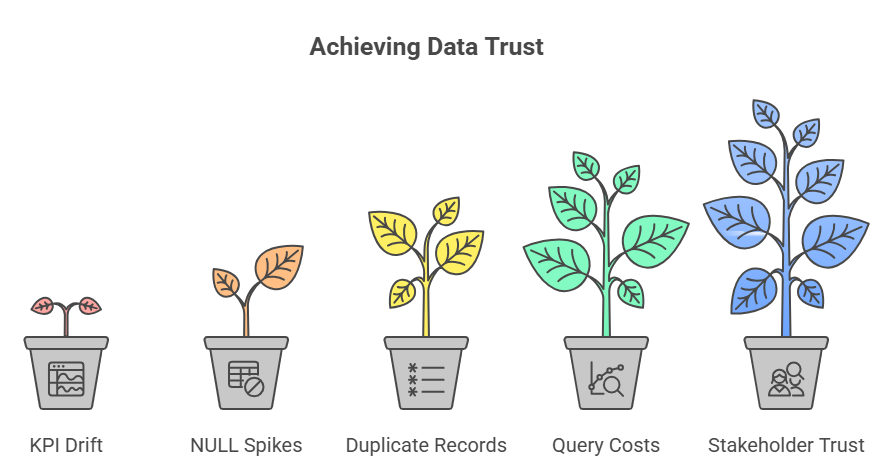
Fig 2: Visual Illustration of Data Quality Issues Range from Subtle to Catastrophic
How to Improve Data Quality in BigQuery
Data quality problems rarely originate from the platform itself. They arise from gaps in ingestion design, validation, governance, and observability.
The solution requires architectural discipline and automated controls.
1. Enforce Deterministic Ingestion
- Build idempotent pipelines so reprocessing doesn’t create duplicates.
- Use proper MERGE logic instead of blind appends.
- Deduplicate using stable business keys — not DISTINCT patches.
- Validate row counts and load volumes against historical baselines to detect anomalies early.
2. Implement Schema & Validation Controls
- Actively monitor schema drift (column changes, data type shifts).
- Set NULL threshold alerts for critical fields.
- Version schemas are intentionally created rather than allowing uncontrolled schema evolution.
- Validate semi-structured (JSON/nested) data before it propagates downstream.
3. Optimize Storage & Query Design
- Partition tables by ingestion or business date.
- Cluster high-cardinality columns such as customer or transaction IDs.
- Monitor bytes scanned and execution plans to detect inefficient queries.
- Archive stale or duplicate datasets to reduce cost and confusion.
4. Introduce Data Testing & Observability
- Automate core data quality tests (uniqueness, NULL checks, referential integrity).
- Define freshness SLAs and alert on delays.
- Track anomaly metrics like row count spikes and revenue variance.
- Continuously monitor duplicates and key violations.
5. Establish Governance & Ownership
- Assign clear data owners (business + technical).
- Maintain a centralized metric registry to prevent KPI drift.
- Create formal data contracts between producers and consumers.
- Certify trusted datasets to establish a reliable source of truth.
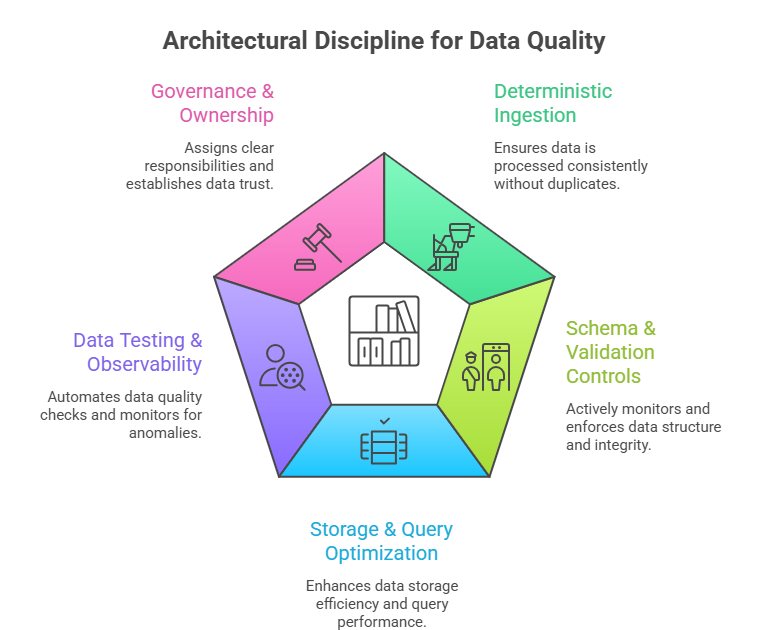
Fig 3: Visual Illustration of Architectural Discipline for Data Quality
Conclusion
Data quality issues rarely appear as obvious system failures. Instead, they quietly erode trust, inflate costs, and weaken decision-making long before they are formally detected. Addressing these challenges requires more than reactive fixes. It demands architectural discipline, automated validation, clear data ownership, and continuous observability embedded directly into data pipelines.
The real question isn’t whether data quality issues exist in your environment; it’s whether you will detect them before they begin impacting business decisions.
Explore our whitepaper on Data Quality in BigQuery to learn how schema validation, pipeline observability, and governance frameworks can help your team identify issues early, strengthen data reliability, and build lasting trust in analytics.